10 Creative Ways to Display a QR Code at Your Wedding (More Uploads)
Where you display your wedding QR code decides how many guest photos you collect. Ten placements ranked, with the size, wording and print tips for each: table cards, welcome sign, program, bar, live wall and five more.


Quick Answer
Put your wedding QR code in at least four places: a card on every table, the bar, the venue entrance and the ceremony program. Add the bathroom mirror and the live photo wall if you can. Print at least 1.5 inches on cards and 4 inches on signs, dark on light, matte. Brief the DJ, the bartenders and the venue coordinator so someone says it out loud.
Where you display your wedding QR code determines how many photos you collect
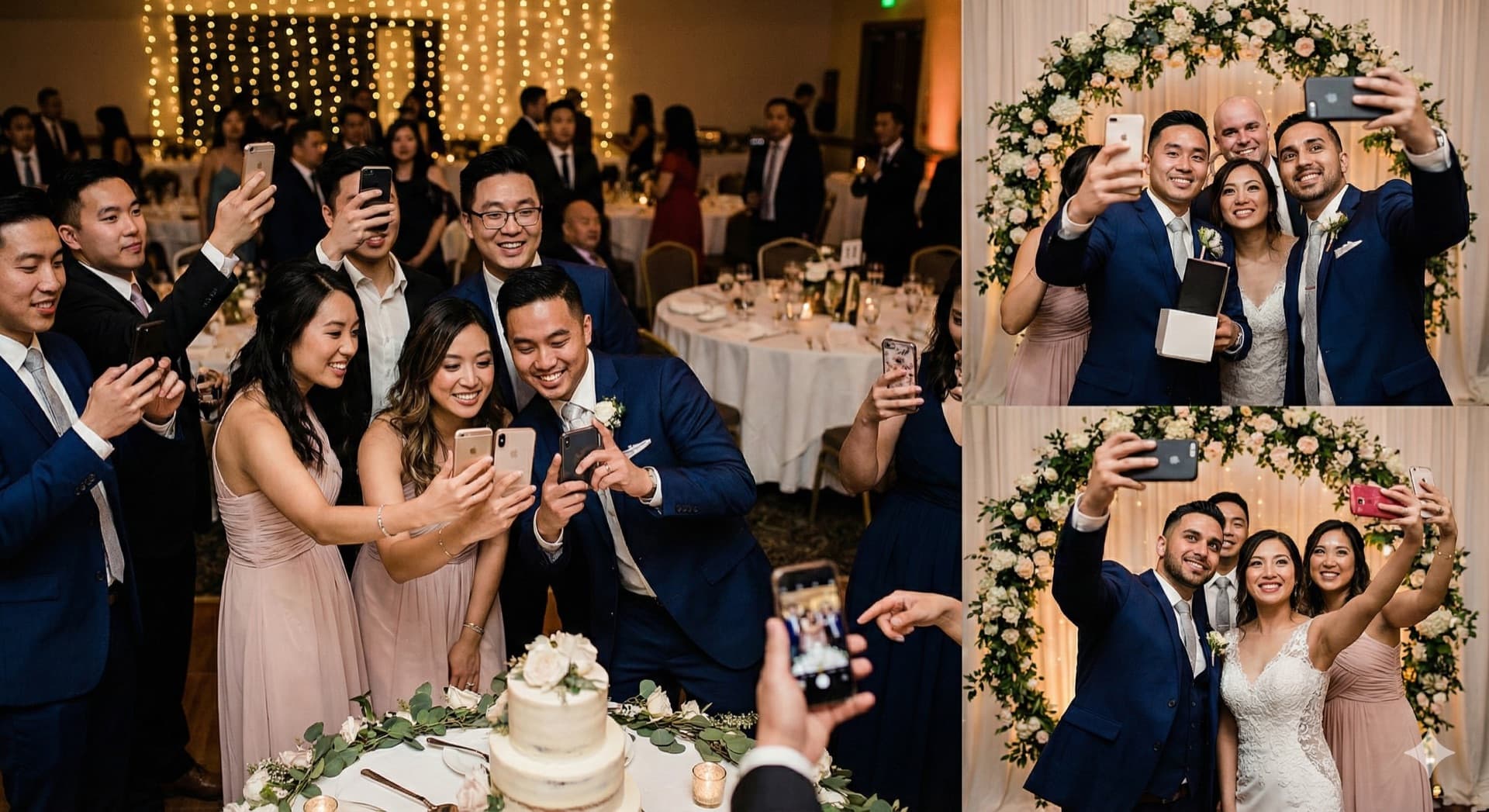
The number of locations matters more than the size of your guest list. A code printed only in the program is under a chair by dinner; a code on every table, at the bar, at the entrance and in the program is in front of every guest at a moment when the phone is already out. This guide assumes you already have your code (if not, start with QR code for wedding photos: how it works and how to set it up) and ranks the ten places to put it, with the size, wording and print notes for each.
1. Individual dinner table cards
Table cards are the single highest-performing QR code placement, accounting for 35–45% of total guest uploads at most weddings. Every guest sits at a table for a minimum of 90 minutes during dinner, has their phone nearby, and is surrounded by people who will see the card too. The social context — everyone at this table is looking at the same card — is a mild peer prompt that drives action.
How to execute it: Print one card per table at minimum. A 4×6 inch folded card that stands upright is the most reliable format — visible from across the table without being obstructive. The QR code should be at least 1.5×1.5 inches. Include one line of text: "Scan to share your photos from today." Guests understand QR codes in 2026 — nothing more is needed.
Sizing and printing tips: Order at 300 DPI minimum, matte finish, on 120gsm cardstock. Glossy finishes cause glare under reception lighting and make codes harder to scan. Test-scan the printed version before mass printing.
Why it ranks first: every guest, seated, for the longest stretch of the evening, with the card inside arm's reach. No other placement has all three.
2. Venue entrance welcome sign
The welcome sign catches guests before the event starts, when they have time to orient themselves and are actively looking for information. An entrance placement reaches 100% of guests at arrival — it's the only guaranteed touchpoint before anyone has had a drink or found their table.
How to execute it: An 18×24 inch printed sign on foam board or vinyl, placed on an easel at eye level. The QR code should be at least 4×4 inches so guests can scan from 3–4 feet away. A backlit sign (printed on frosted acrylic with LED backing) is especially visible in dimly lit venues.
Text to use: "Scan to share your photos with [couple's names]. No app needed — takes 10 seconds."
Pro tip: Set up the welcome sign before the ceremony, not just the reception. Guests who see the code at arrival are more likely to use it throughout the day.
3. Inside the ceremony program
Ceremony programs are handled by every guest before the ceremony starts — read while waiting, carried through the service, often kept as a keepsake. Placing the QR code inside the program reaches guests during the quietest, most attentive moment of the day.
Why this placement is special: Ceremony photos are under-collected at most weddings. Your professional photographer covers key moments, but reaction shots from the congregation — guests crying during vows, children in the front row, the flower girl's face during the processional — are uniquely captured by guests with phones. The program placement specifically encourages ceremony photography, not just reception.
How to execute it: Print at 1.5×1.5 inches minimum inside the program, on a dedicated half-page or as part of a "share your photos" message. Programs on heavier laminated card stock can cause glare — test before printing.
4. Bar area display
The bar is the social hub of every reception. Guests visit multiple times, spend extended time waiting for drinks, and are in a relaxed, phone-ready state. Bartenders also provide a human reinforcement point — briefed staff can mention the QR code while pouring: "There's a code right here to share your photos with the couple."
How to execute it: A tent card (5×7 inches when folded) on each section of the bar. For long setups (10+ feet), use two — one per end. Alternatively, a chalkboard or acrylic sign mounted behind the bar at eye level. Ensure good contrast in low-light bar environments: black code on white, or white code on dark background with a white border.
Why it matters: the bar is the one place guests return to several times a night, standing still, with nothing in their hands but a phone. It is the strongest single addition after table cards.
5. Bathroom mirrors
The most counter-intuitive placement — and one of the most effective. Guests check mirrors constantly throughout a reception, and the bathroom is one of the few places where someone is alone with their phone with nothing else competing for their attention. Guests come back from the bathroom having uploaded the photos they forgot about at the table.
How to execute it: A 4×6 inch removable cling applied to the mirror above the sink. Order from Vistaprint, Canva Print, or any local print shop. Alternatively, a framed card on the vanity shelf. Text: "Bathroom selfie? We want to see it. Scan to upload."
Logistics note: Brief your venue coordinator in advance — some venues have policies about adhesives on mirrors. Removable glass clings leave no residue and are generally accepted.
6. Live slideshow screen
If you're running a live slideshow during the reception — where guest photos appear on a projector screen in real time as they're uploaded — the screen itself becomes a persistent QR code placement. Displaying the code in a corner of the slideshow, small and constant at about 10% of screen width, means every guest who looks at the screen sees it throughout the evening.
Why this creates a feedback loop: When guests see their own photos appear on screen, they immediately want to upload more. When others see photos appearing, they want to contribute too. Of everything on this list, the live wall is the one placement that keeps asking all evening without anyone saying a word.
How to set it up: Snapeen's Premium plan includes a live slideshow feature that runs in any browser. Connect a laptop to a projector via HDMI, open the slideshow link in full-screen mode, and photos appear automatically as guests upload.
7. Escort card and seating chart display
Every guest interacts with the escort card table or seating chart at arrival to find their seat — 100% reach, high-attention moment, phone already in hand (most guests photograph the seating chart). A framed card next to the seating chart is seen precisely when guests are already in "look and scan" mode.
How to execute it: A 5×7 framed print next to the seating chart, or a standing tent card in the center of the escort card table. The context is self-reinforcing: guests who photograph the seating chart are already primed to think about their phone camera.
8. Photo booth and selfie station
Photo booths and styled selfie stations are specifically designed for guests who want to take photos — and those guests are the most likely to upload. Placing the QR code at the photo booth makes the upload step a natural extension of the photo-taking experience. And if a booth rental is not in the budget, the wedding photo booth alternative — every guest's phone plus one QR code — delivers the same photo-collecting effect across the whole venue.
How to execute it: A sign next to the props basket, a frame on the booth surround, or (for digital booths) a QR code on the booth screen between uses. Add: "Upload your booth photos here" — it makes the purpose concrete rather than abstract.
9. Wedding cake and dessert table
The cake table draws guests during the cutting ceremony and again throughout the evening for dessert. It's a natural gathering point and a high-photography moment — meaning guests already have their phones out. A small standing card next to the cake is visible during the cutting itself.
How to execute it: A 3×5 standing card placed to the left or right of the cake — not directly in front, where it would obstruct cake photos. Keep it minimal: just the QR code and one short line.
10. Exit arch or farewell display
The exit moment — sparkler send-off, petal toss, or guests gathering to wave the couple off — is one of the most photographic moments of the evening, and guests often have camera rolls full of photos they haven't uploaded yet. An exit placement serves as a final reminder.
How to execute it: A sign on or near the exit arch, a small card on the sign-out table, or a QR code projected onto the exit wall during the send-off. Text: "Thank you for celebrating with us — share your photos here."
How many placements should you use?
Use at least four. The best starting combination: (1) table cards, (2) bar area, (3) venue entrance, (4) ceremony programs. Fifth addition: bathroom. Sixth: live slideshow.
There's no maximum — every placement adds marginal uplift. For most couples, four to six is the practical target.
How to brief your vendor team
Your venue coordinator, DJ or MC, and bartenders are your three most important distribution allies:
- Venue coordinator: Confirm placement logistics in advance and ask them to set up QR code signage before guest arrival.
- DJ or MC: Provide a 15-second script. Ask for two announcements: at the start of dinner and after the first dance. Include the couple's names, how long uploading takes (10 seconds), and a mention of the live screen if you're running one.
- Bartenders: A casual "The couple has a QR code to collect photos — it's on the card right here" takes 5 seconds and measurably increases uploads.
Signage gets noticed; a person saying it out loud gets it done. Do both.
See also: QR code for wedding photos: how it works and how to set it up · How to set up a wedding QR code in under 5 minutes · How to collect wedding photos from guests
Frequently Asked Questions
The 10 highest-performing spots are: (1) every reception table card, (2) bar area, (3) venue entrance/welcome table, (4) ceremony programs, (5) bathroom mirrors, (6) photo booth station, (7) live slideshow screen, (8) escort card display, (9) cocktail hour signage, and (10) wedding cake table. Use at least four of them.
On a 4×6 inch table card, the QR code should be at least 1.5×1.5 inches (about 4×4 cm). This allows scanning from 20–30 cm. Use high contrast and leave a clear white border. Always test-scan the printed version before mass printing.
Yes. Snapeen's paid plans allow color customization to match your wedding palette. However, avoid over-customizing — too many design elements reduce scannability. A simple color change and rounded corners are safe; adding a logo in the center works well on Premium plans.
Topics

Written by
Emily Rodriguez
Helping couples and event planners capture every precious moment with modern QR code photo sharing technology.
Ready to collect your event photos?
Set up your QR code in 2 minutes. Guests scan and upload instantly — no app needed.
Continue Reading
Related Articles
How to Collect Wedding Photos from Guests: 5 Methods Compared (2026)
The easiest way to collect wedding photos from guests is a QR code that opens an upload page in their phone browser. Here is how it compares with shared albums, group chats, hashtags and disposable cameras, and the three things that decide how many photos you actually get.

10 Ways Couples Lose Wedding Photos (And How to Prevent It)
Don't let precious memories disappear! Learn the most common ways couples lose wedding photos and simple solutions to protect them.
Wedding Photography Statistics 2026: 35 Facts Every Couple Should Know
The numbers behind wedding photography in 2026 — budget, guest behavior, photo delivery, regrets, and how modern couples are collecting candid shots. 35 stats from real weddings.