★★★★★#1 App for sharing photos at events

Easily Collect Photos
From Every Guest At Your Wedding

Gather every photo & video from your guests into a digital album, ready to share in a live slideshow — no apps, no hassle.

Start free · Setup in under 2 minutes
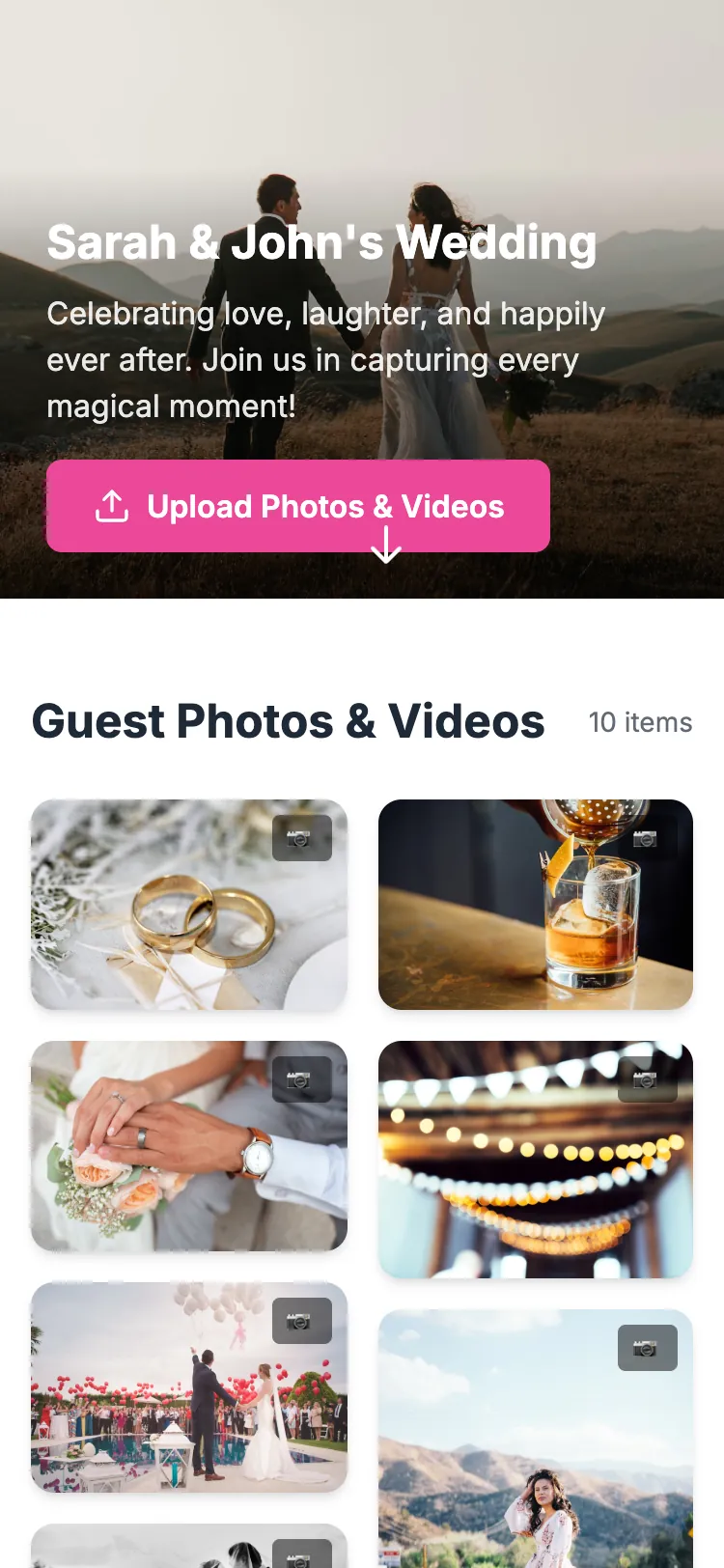
Snapeen guest event page on a phone: wedding cover with the Upload Photos & Videos button above the live gallery of guest photos

Scan to upload

No app needed — guests land right here

1,000+
Weddings
105K+
Photos/mo
4.9
Rating

Meet Snapeen

All your guests’ photos, in one gallery

Snapeen turns any event into a shared photo experience. Guests upload straight from their phone browser — no app, no account — and you turn the best shots into collages, posters, and a gallery that lives on.

The heart of Snapeen

Every guest becomes your photographer

One QR code gathers every photo and video from your event — hundreds of candid moments no single photographer can catch. That’s what Snapeen is for; everything else is a bonus.

Lena’s 30th Birthday

1

Create your event

Set it up in under two minutes and get a unique QR code and link for your event.

snapeen.com/e/lena-30
Upload Photos & Videos
2

Guests scan & upload

The upload page opens right in their browser — no app, no account, nothing to install.

Guest photo of friends celebrating with sparklers
Guest photo of the newlyweds in a confetti shower
Guest photo of hands throwing colorful confetti
Guest photo of the decorated celebration table
Guest photo of the flower-decorated wedding arch
Guest photo of the couple embracing outdoors
Live
3

The gallery fills up live

Every photo and video lands in one shared gallery the moment it’s taken — ready for the big screen.

Your event, your rules

Every event gets its own private gallery. Edit the details, decide who can add photos and who can see them — Snapeen follows your lead.

Make it yours. Name, date, and cover photo — set up in seconds.

Lena’s 30th Birthday

Event nameLena’s 30th Birthday
DateSep 12, 2026
CoverSunset gradient

You set the rules. Decide who can add photos and who can see the gallery.

Guests can upload
Private gallery
Live slideshow

Take it all home. Download every photo and video in one click.

lena-30-photos.zip

847 photos · 62 videos

Download all
Wedding couple photo used on a Snapeen event poster with names, date and upload QR code

Sarah & John

June 14, 2026

Scan to share your photos

Poster

Make every event poster-worthy

Turn a favorite photo into an elegant event poster — your names, your date, and a QR code guests scan to add their own photos to the gallery.

Create a poster

Poster Studio

Design it yourself in minutes

Open the Poster Studio, pick a template — wedding, birthday, formal invitation — and drop in your names, date and venue. Every detail is editable.

When it’s ready, export a print-ready A4 PDF with bleed and safe-margin guides, or share it straight to your event.

Try the Poster Studio
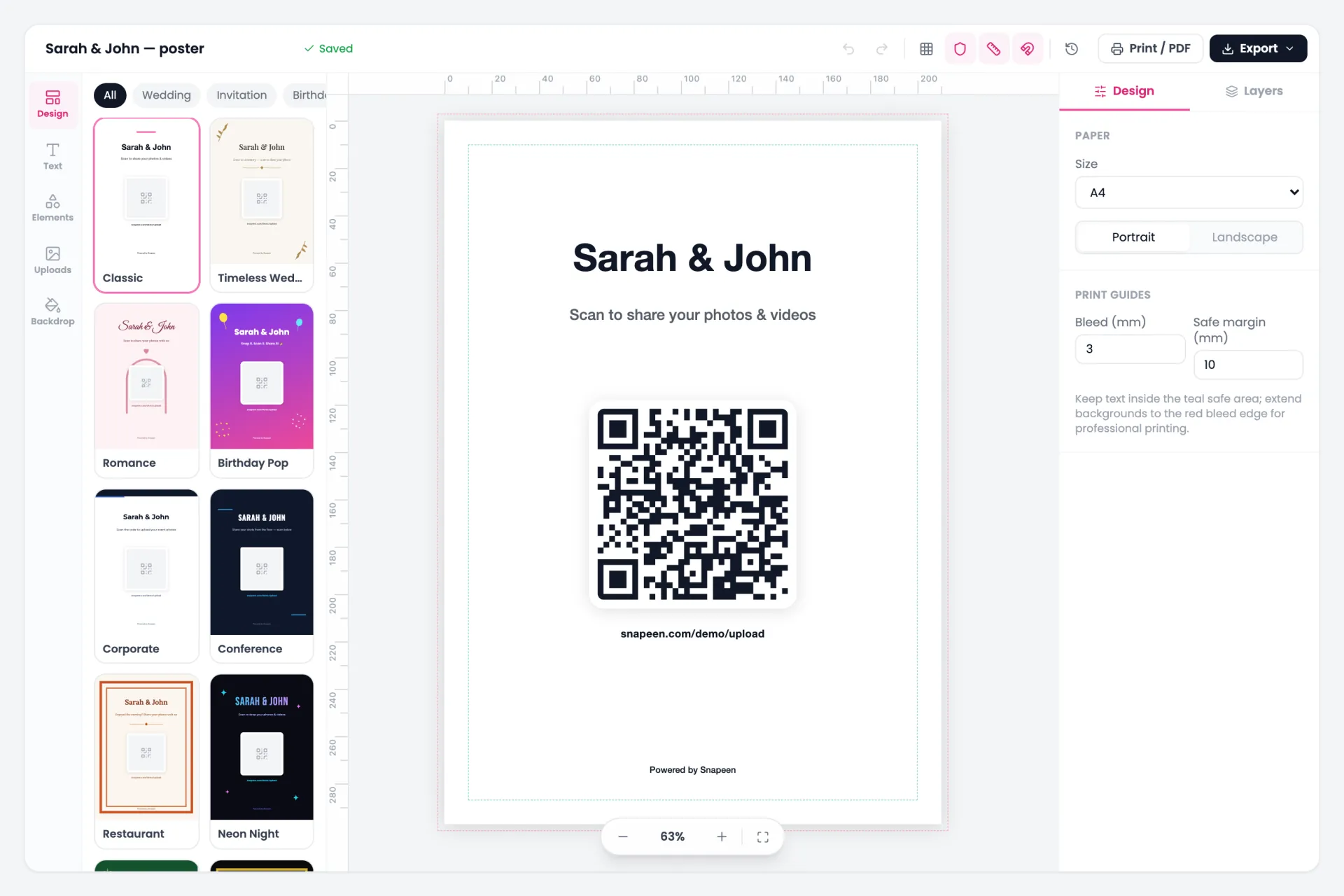
The Snapeen Poster Studio editor: poster template gallery, an A4 canvas with event name and upload QR code, and print settings for paper size, bleed and safe margins

Collages

Select a template

Pick a template, drop in your favorite guest photos, and Snapeen arranges them into a collage that’s ready to share or print — no design skills needed.

Happy newlyweds celebrating among their guests, ready to share every photo

Shareevery smile

The party doesn’t end when the music stops. Beam photos to a live slideshow during the event, then share the full gallery with a single link.

Guest photo of friends with sparklers on the live event slideshow
Guest photo of a crowd under golden confetti on the live slideshow
Guest photo of a candlelit celebration dinner on the live slideshow
Guest photo of the decorated event table on the live slideshow
Guest photo of the wedding arch on the live slideshow
Guest photo of confetti over the dance floor on the live slideshow
Live

Lena’s 30th Birthday

Live slideshow

Photos appear on the big screen seconds after guests snap them — plug it into a TV or projector at the venue.

One link for everyone

Send the gallery to anyone — no account, no downloads, just memories.

snapeen.com/e/lena-30

105,044

photos captured

1,000+

events celebrated

4.9

average rating

Every one uploaded by a guest with a phone — no app, no accounts.

Verified Real Customer Reviews

Real Couples, Real Results

★★★★★Rated 4.7/5 based on 500+ verified reviews

Wedding

We collected 847 photos from our 150 guests at Barn at Raccoon Creek! Our photographer missed so many candid moments during cocktail hour, but our guests captured everything.

Bob & Anna Thompson

🇺🇸 Colorado, USA

Corporate Party

Used Snapeen for our company's party with 300 attendees. We got over 1,200 photos and videos in just 2 days! The IT team loved that guests didn't need to download anything.

Jennifer Martinez, Event Manager

🇺🇸 Austin, Texas

Destination Wedding

Our destination wedding in Bali had guests from 8 countries. Snapeen worked perfectly despite varying wifi speeds—photos uploaded automatically when people got back to their rooms.

David & Priya Patel

🇬🇧 London, UK

Birthday Party

My 50th birthday party was supposed to be small, but 75 people showed up! I printed the QR code on a poster at the entrance. By the end of the night, I had 392 photos—including some hilarious ones from the dance floor I never would have seen otherwise.

Robert Chen

🇨🇦 Vancouver, Canada

Professional Recommendation

As a wedding photographer, I now recommend Snapeen to all my clients. It doesn't compete with my work—it complements it. Couples get the candid guest perspective + my professional shots.

Amanda Rodriguez, Wedding Photographer

🇺🇸 Southern California

Beach Wedding Weekend

We hosted a weekend beach wedding with events on Friday and Saturday. We created separate albums for the welcome party and the main ceremony, and our guests uploaded over 1,200 photos! The gallery looked amazing and matched our theme perfectly. We're still discovering new moments weeks later.

Emily & Lucas Thompson

🇺🇸 California, USA

Event Photo Sharing For Any Occasion

From intimate weddings to grand conferences, we've got every moment covered.

Support

Frequently Asked Questions

Everything you need to know about collecting wedding photos from guests.

Popular Topics

Guests don't need to download any app or create an account. Unlike other photo sharing apps, Snapeen works instantly through a web browser. Guests simply scan your unique QR code or enter a URL, and they can upload photos immediately. It's so simple that even grandparents can use it without any help.
QR code for wedding photos: set up in 10 minutes
You can download each photo or video individually, or use batch download to get all files in a zipped folder. Once downloaded, you own the photos completely - save them to your storage, print them, share on social media, or use them however you want. You have full control over who can download photos from your wedding album.
Guide to downloading and organizing your wedding photos
While Google Photos, Dropbox, and chat groups can collect photos, they're not designed for events. These apps require logins, multiple steps, and often compress photo quality. Snapeen is specifically built for weddings and events - no login needed, instant QR code access, unlimited storage, live slideshow feature, and original photo quality. Guests upload photos faster, and you get 3-5x more photos compared to traditional methods.
Complete comparison: Snapeen vs other photo sharing apps
Many couples print QR codes on table cards, welcome signs, and ceremony programs. Place QR codes at each reception table, at the entrance, or near the bar. Guests scan the code with their phone camera and upload photos instantly. We provide high-resolution QR codes perfect for printing in any size.
QR code design ideas and printing guide
Snapeen supports multi-day events like destination weddings, wedding weekends, or celebrations that span several days. Choose a plan that matches your event duration - from rehearsal dinner through the reception. All photos from every day go into one beautiful gallery.
Planning a multi-day wedding event
The Photo Wall is a real-time slideshow that displays all guest uploads - photos and videos - as they happen. It's perfect for displaying on projectors, smart TVs, or tablets at your reception. Access it through any web browser and connect via HDMI, Chromecast, or Apple TV. Guests love seeing their photos appear instantly on the big screen.
Setting up your live photo slideshow
Only people with your unique link or QR code can access your gallery — nothing is public or searchable. We never use, share, or interact with your photos in any way. You maintain full ownership and control. Your memories are yours alone, protected with secure encryption.
Privacy and security features explained
Professional photographers capture amazing moments, but they can't be everywhere at once. Guest photos show authentic, candid moments from unique perspectives - grandma's tears, friends' reactions, behind-the-scenes fun. Many couples use both: professional photos for formal shots and Snapeen for guest perspectives. Your photographer can even upload their photos to the same gallery! Some couples on a budget use Snapeen as their primary photo collection method.
Snapeen works anywhere in the world. All your guests need is an internet connection. Perfect for destination weddings, international celebrations, or events where guests travel from different countries. No special setup required - it just works globally.
Snapeen offers flexible pricing based on your event duration. Plans start with a free trial, and paid plans include unlimited photo uploads, unlimited guests, full HD quality, and gallery access for 12 months after your event date. Check our pricing page for current rates and special offers.
View all pricing plans and features
Your photos remain accessible based on your plan, always counted from your event date — not from purchase: Free events keep the gallery for 30 days after the event, One-Time and Premium plans for a full 12 months after the event. This gives you plenty of time to download and save all your wedding memories. We recommend downloading your photos soon after your event to keep them forever. Once downloaded, the photos are yours to keep, print, and share however you like.
Understanding photo storage and download options
There is no limit. Unlike Google Photos (which has storage caps), Instagram (limited to 20 photos per post), or WeTransfer (file size limits), Snapeen accepts unlimited uploads. Guests can share as many photos and videos as they want, quality is preserved at full resolution, and there are no hidden fees. On average, weddings collect 500-2000 photos from guests.
The complete guide to collecting 1000+ photos from guests
Snapeen supports all common photo formats (JPG, PNG, HEIC) and video formats (MP4, MOV, AVI). We accept files up to 500MB each - large enough for 4K videos from modern phones. Videos are displayed in your gallery and slideshow without compression. Both photos and videos maintain their original quality, unlike social media platforms that compress files.
You can customize your gallery with your wedding colors, add a custom welcome message, include your event details, and upload a cover photo. Create albums to organize photos by event (ceremony, cocktail hour, reception, after-party). Customize the QR code design to match your wedding theme. The gallery design is mobile-friendly and looks beautiful on any device.
Customization options and design ideas
Even if guests miss the QR code, they can access your gallery through your custom URL (like snapeen.com/xi9Ds881). You can find this link in your dashboard when you signup. Copy it and send via text message, or on social media. Guests can save the link and upload photos days or even weeks after the event if they forget during the celebration.
You and your guests own the photos. Snapeen never claims ownership or rights to your photos. We don't use them for marketing, training AI, or any other purpose. Your photos are your private property. Guests retain copyright of photos they upload, and you have permission to use all photos in your gallery. Download everything and keep them forever - they're yours.
Understanding photo ownership and rights
You can upload your own photos and videos anytime - before, during, or after your event. Many couples upload professional photos from their photographer, engagement photos, or photos from pre-wedding events. Create a complete wedding story in one place. You can also give your photographer VIP access to upload directly to your gallery.
The Photo Wall works on any device with a web browser. Connect your laptop to a projector via HDMI, cast from your phone using Chromecast or AirPlay, or open it directly on a smart TV. No special equipment needed. The slideshow automatically updates as guests upload photos - perfect for displaying at your reception, cocktail hour, or after-party.
Technical setup guide for venues and AV equipment
While Snapeen is built for weddings, it works the same way for any event: birthday parties, corporate events, conferences, anniversaries, baby showers, graduations, family reunions, festivals, and more. Any gathering where you want to collect photos from multiple people gets the same features - QR codes, live slideshow, unlimited uploads.
Other type of events
Our support team can assist with setup, troubleshooting, customization, and answering any questions. We offer live chat support, email support, and detailed guides for every feature. Many couples also watch our quick video tutorials. Setup typically takes just 5-10 minutes, and we'll guide you through every step if needed.
How to collect wedding photos from guests →

Still have questions?

Send us a message and we’ll walk you through it.

Ready to catch every moment?

Create your first event free — it takes less than two minutes.

Free forever plan · No credit card required