Wedding QR Code Design Ideas: How to Make It Look Beautiful (Not Just Functional)
Your wedding QR code doesn't have to look like a parking meter receipt. From color matching to frame styles, sign wording, and the printing mistakes that kill scannability — here's how to design a QR code that fits your wedding aesthetic.

Quick Answer
A wedding QR code can be color-matched to your palette, given rounded corners, and have a small logo added to the center — codes tolerate up to roughly 30% logo coverage thanks to built-in error correction — all without hurting scannability, as long as you keep strong contrast and a clear border around the code. The biggest scan-killers are glossy lamination, pastel-on-pastel color combos, and codes printed smaller than 1.5×1.5 inches. Match your frame and sign wording to your wedding theme, keep the copy to one short line, and always test-scan a printed proof before ordering the full run.
Your QR code is part of your wedding décor now
A QR code for guest photos isn't optional anymore — most couples use one to collect guest photos without asking anyone to download an app. But a plain black-and-white square dropped onto a printed card can look like an afterthought next to your carefully chosen florals, signage, and table settings.
The good news: a QR code can be customized quite a bit — color, frame, surrounding design, even a logo in the center — without hurting its ability to scan, as long as you follow a few rules. This guide covers how to design one that looks like it belongs at your wedding, not like it was printed at the post office.
(If you're looking for where to put your QR code rather than how to design it, see our guide on 10 creative ways to display a wedding QR code.)
Rule one: contrast before color
Before any aesthetic decision, the code has to scan reliably from a normal distance, in reception lighting, on an older phone camera. That comes down to contrast between the code's pattern and its background — not the specific colors you pick.
- Safe combinations: dark code on a light background (navy on cream, black on white, deep green on blush) or light code on a dark background (white on black, cream on charcoal).
- Avoid: light-on-light or dark-on-dark combos (gold on white, navy on black) — these fail scans far more often, especially under dim reception lighting.
- Always leave a white or light "quiet zone" — a clear border of at least 2–3mm around the code with no design elements crossing into it. Phones use this border to find the code's edges.
Once contrast is solid, you have far more color freedom than most couples assume.
Matching your QR code to your wedding palette
Single color swap. The simplest customization: change the code from black to one of your wedding colors — sage green, dusty blue, terracotta, burgundy. This alone makes a generic code feel intentional, and it's supported on Snapeen's paid plans without affecting scan reliability.
Two-tone with your background. Pair a colored code with a complementary card background instead of plain white — a deep forest green code on a cream card, or a navy code on a soft blush card. Keep the contrast rule in mind: test-scan before committing to a print run.
Rounded corners and dot styles. Some QR generators (including Snapeen's) offer rounded "dots" instead of sharp squares, and rounded corner markers instead of the default square ones. This softens the code's look considerably and pairs especially well with script fonts and romantic, garden-style wedding themes.
What to skip: Gradient fills across the code itself, multiple colors within the pattern, or busy background patterns directly behind the code. These are the most common reasons a "beautifully designed" QR code fails to scan — phone cameras read contrast, not aesthetics.
Adding a logo or monogram to the center
A small logo, monogram, or icon placed in the center of the code is one of the most popular upgrades, and it's safe because QR codes have built-in error correction — a code can lose up to roughly 30% of its center area to a logo and still scan correctly, as long as the rest of the pattern is clean and high-contrast.
Popular center additions:
- A couple's monogram (initials in a simple typeface)
- A small heart, ring, or floral icon matching the invitation suite
- A miniature version of the wedding crest or logo, if you have one
Sizing rule: keep the logo to roughly 20–25% of the code's total width, centered, with a small white or matching-background buffer around it so it doesn't bleed into the scannable pattern. Always test-scan the final version — different phone cameras have slightly different tolerance for center coverage.
Frame and sign design styles, by wedding theme
The QR code itself is only part of the design — the card, sign, or frame around it carries most of the visual weight. A few directions that work well for common wedding styles:
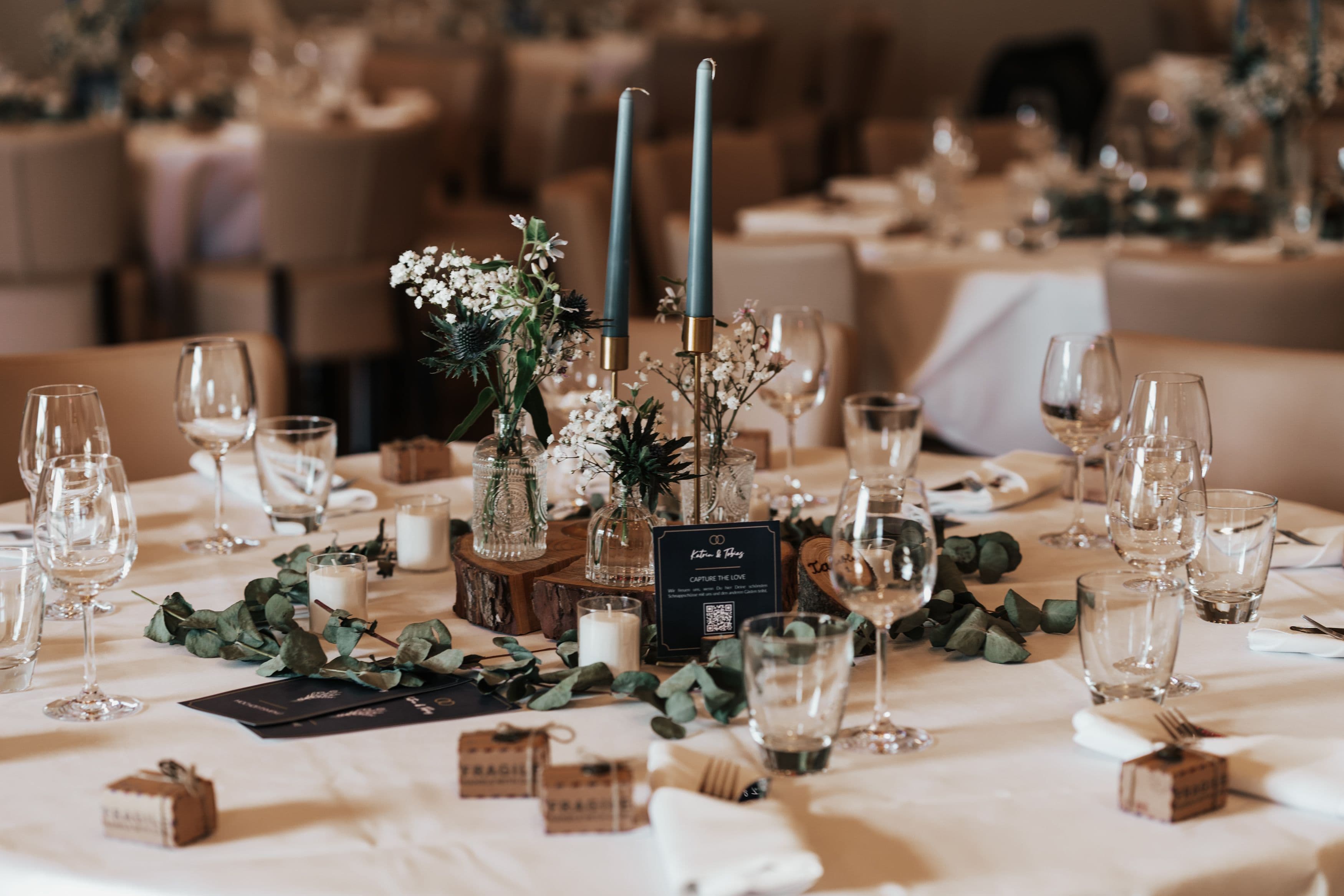
Classic and elegant. A thin gold or silver foil border around a cream or white card, the code in black or deep navy, paired with a serif or script heading like "Share Your Photos With Us." Works on table cards, a freestanding acrylic sign, or inside the ceremony program.
Rustic and outdoor. A kraft-paper or linen-textured card, code in dark brown or forest green, mounted in a small wooden frame or clipped to a twine-and-clothespin display near the guest book. Pairs well with wildflower or greenery-heavy décor.
Modern minimalist. A plain white or black card, the code in a single accent color, generous white space, and a short sans-serif line of text — no border, no ornamentation. Often displayed on a simple acrylic stand.
Boho and garden. A code with rounded dot styling in a muted terracotta or sage tone, set against a pressed-botanical or watercolor-wash background, framed with a thin organic-shaped border.
Beach and destination. Code in a soft navy or coral, printed on a card with a subtle wave or linen texture, often paired with a "Wish you were scanning this in person!" line for guests joining remotely.
In every case, the same rule applies: pick one accent color or texture and let the code sit in a clean, high-contrast zone within it — don't let the surrounding design touch the code's quiet zone.
Sign wording that actually gets scanned
The design gets attention, but the words next to the code are what convince someone to actually scan it. Short, specific, and warm outperforms generic every time.
A few lines that work well:
- "Scan to share your photos with us — no app needed!"
- "Help us see our wedding through your eyes. Scan & upload."
- "Got pics? We want them. Scan to upload."
- "Your phone, our memories. Scan to share what you captured today."
- "Smile! Now scan and send us that photo."
Keep it to one short line. A code surrounded by three paragraphs of instructions gets skipped — guests in 2026 know what a QR code is; they just need a reason and a nudge.
Materials and printing choices
| Material | Best for | Approx. cost |
|---|---|---|
| Matte cardstock (120gsm+) | Table cards, programs | $0.20–0.50/card |
| Acrylic sign | Welcome table, entrance | $15–40 |
| Wood-mounted print | Rustic/outdoor themes | $20–45 |
| Fabric banner | Backdrops, large signage | $30–70 |
| Vinyl cling | Mirrors, glass surfaces | $5–15 |
Always choose a matte finish over glossy. Glossy lamination and glossy photo paper both create glare under reception lighting and string lights — a frequent, avoidable cause of failed scans. Matte finishes scan reliably under almost any lighting.
Common design mistakes that hurt scannability
- Making the code too small. Under 1.5×1.5 inches on a table card is hard to scan from a normal seated distance. Bigger is safer.
- Glossy lamination or paper. Creates glare that blocks the camera from reading the pattern.
- Low contrast color choices. Pastel-on-pastel or metallic-on-metallic combinations look elegant but frequently fail to scan.
- Skipping the test scan. Always test a printed proof — on multiple phones — before ordering a full print run.
- Letting decorative elements cross the quiet zone. Borders, ribbons, or flourishes that overlap the code's edge confuse the scanner.
- Oversized center logos. Past roughly 30% coverage, even error correction can't compensate.
Free tools for designing your QR code
You don't need a graphic designer to pull this off. Snapeen's paid plans include built-in color and rounded-style customization when you generate your code, so the QR itself is ready to use immediately. From there, Canva (the free tier is enough) has hundreds of wedding sign and table card templates where you can drop in your downloaded QR code, swap the colors to your palette, and add your own wording in minutes.
FAQ
See also: 10 Creative Ways to Display a QR Code at Your Wedding · How to Set Up a Wedding QR Code in Under 5 Minutes
Frequently Asked Questions
Yes, on platforms that support it (including Snapeen's paid plans) you can recolor the code to match your wedding palette. The only rule that matters is contrast: pick a dark color on a light background or a light color on a dark background, and avoid pairing two pastel or two metallic tones, since low-contrast combinations are the most common reason a custom-colored code fails to scan.
Not if it's sized correctly. QR codes have built-in error correction that allows roughly 20–30% of the code's area to be covered without affecting scannability. Keep a logo or monogram centered, sized to about a quarter of the code's width, with a small clear buffer around it, and always test-scan the final design on a few different phones before printing.
Dark code on a light background (navy on cream, black on white) or light code on a dark background (white on charcoal, cream on navy) are both reliable. Avoid light-on-light combinations like gold on white, or dark-on-dark like navy on black — these significantly increase scan failures, especially under dim reception lighting.
Use a matte laminate or matte cardstock, not a glossy finish. Glossy surfaces create glare under reception lighting and string lights, which is one of the most common — and most avoidable — reasons a QR code fails to scan. If you want extra durability, matte lamination protects the print without the glare problem.
Keep it to one short, warm line rather than instructions. Lines like "Scan to share your photos with us — no app needed!" or "Got pics? We want them. Scan to upload." consistently outperform longer, more formal wording. Guests already understand QR codes in 2026 — the sign just needs to give them a reason to scan.
Topics

Written by
Alex Morgan
Helping couples and event planners capture every precious moment with modern QR code photo sharing technology.
Ready to collect your event photos?
Set up your QR code in 2 minutes. Guests scan and upload instantly — no app needed.
Continue Reading
Related Articles
How to Collect Wedding Photos from Guests (Complete 2026 Guide)
The easiest way to collect wedding photos from guests is a QR code — no app needed, 500–1,200 photos in 24 hours. Here's exactly how to set it up, where to display it, and what to do with everything afterward.

10 Ways Couples Lose Wedding Photos (And How to Prevent It)
Don't let precious memories disappear! Learn the most common ways couples lose wedding photos and simple solutions to protect them.

10 Creative Ways to Display a QR Code at Your Wedding (More Uploads)
Where you display your wedding QR code determines how many guest photos you collect. Data from 1,000+ weddings shows which placements drive the most uploads — table cards, bar areas, live slideshows, and 7 more.